How We Built a Lead Scraper With AI (and How You Can Use It)
Building a list of local businesses by hand takes days. We used AI to build a tool that does it in minutes — type a category and a place, get names, phones, emails and websites, export to Excel. Here's how we built it and how to get the most out of it.
If you've ever had to build a list of prospects by hand, you know the drill. Search "dentists in Austin" on a map, open a listing, copy the name, copy the phone number, open the website, hunt for an email address, paste it all into a spreadsheet — then do it again two hundred times. It's slow, it's boring, and by the time you're done the first rows are already out of date.
We kept running into this ourselves, so we built a lead scraper to do it for us. And we built most of it with AI. This post covers both halves: how we used AI to build the tool, and how you can use the tool to put together a clean list of local business leads in a few minutes.
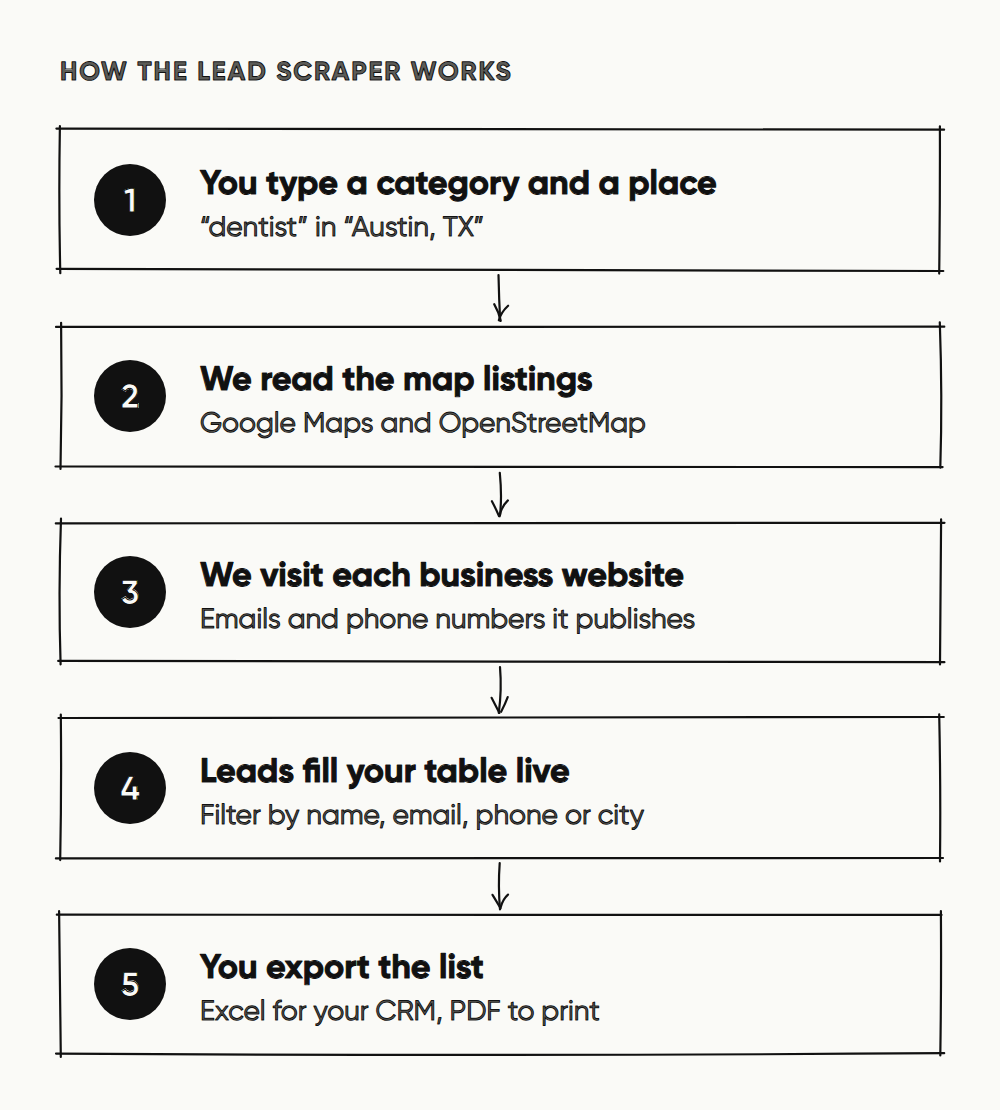
The short version: you type a business category and a place. The tool finds matching businesses, visits their websites to pick up contact details, and gives you a table with name, phone, email, website, address, rating and review count — ready to export to Excel or PDF.
What the lead scraper actually does
A lot of tools call themselves lead generators. Ours does one thing well: it finds local businesses. It isn't a database of people or job titles. It reads public map listings and business websites, so it's good at questions like "every interior designer in Brooklyn" or "every gym in Scottsdale".
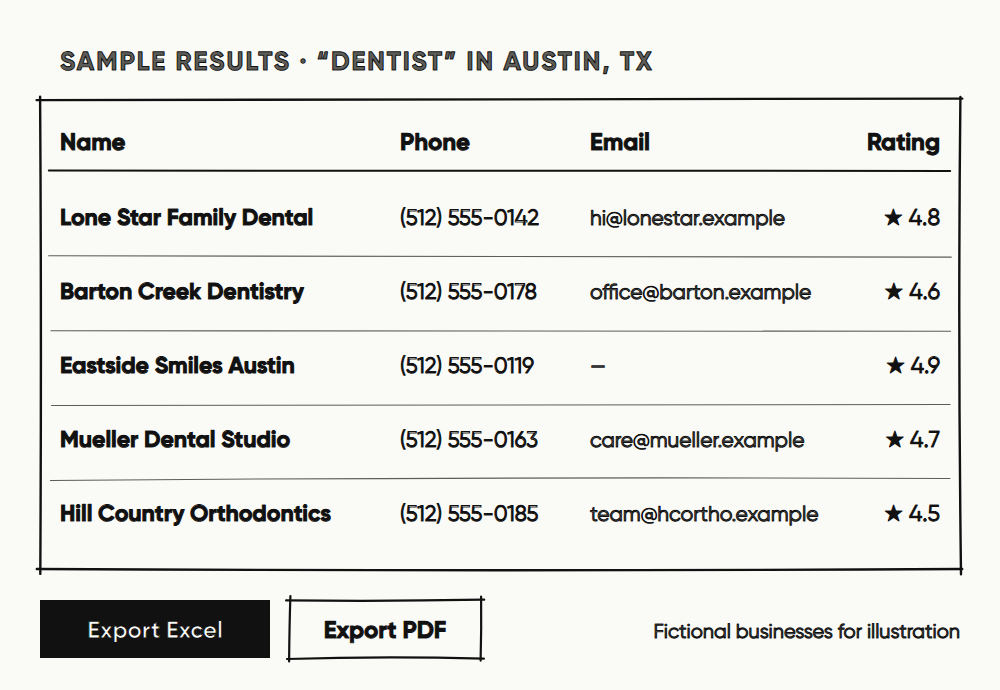
For every business it finds, you get:
- Business name and category
- Phone number
- Email address — the main one, plus any others found on the website
- Website
- Address and city
- Rating and number of reviews, where the listing has them
- Which source the lead came from
You pick where it looks. OpenStreetMap is free and open data. Google Maps has the widest coverage. You can combine sources in a single search, and tick "include nearby areas" when one neighborhood isn't enough.
How we built it with AI
We're a small team, and a lead scraper has more moving parts than you'd think: search, a crawler that visits thousands of websites politely, sign-in, usage limits, payments, exports. A few years ago that would have been months of work for a team our size. We shipped it with AI coding assistants doing much of the typing — and we learned a lot about where AI helps and where it doesn't.
Where AI did the heavy lifting
- Planning. Before writing code, we had the AI break the product into phases and list what could go wrong in each one. That list became our checklist.
- Boilerplate. API routes, data models, the results table, Excel and PDF export — the parts that are necessary but not interesting were drafted by AI and then reviewed by us.
- Review. We asked the AI to review its own changes and ours. It caught real bugs, including one where a single click could submit the same lead twice.
- Tests and checks. The scripts that walk through the whole flow end to end — sign in, search, export — were written with AI help, and they run on every change.
Where we still had to decide
AI writes code quickly. It doesn't decide what's fair to your users. These were product calls, and we made them ourselves:
- You only pay for what you get. When you start a search, we set aside your quota. If it finds fewer leads than you asked for, or you cancel halfway, the difference goes back to your balance. A background job settles searches nobody watched to the end, so that happens even if you close the tab.
- We don't keep your results. Your lead list lives in your browser tab and disappears when you close it. We never build a database from what you search.
- We ask who is searching. The crawler visits other people's websites, so you sign in with Google first. That keeps the tool from being used anonymously at scale.
- We keep limits. Searches run on our servers with per-account rate limits and a cap on results per search, so the tool can't be turned into a firehose.
To be clear about one thing: the AI was our engineering partner, not the engine. The scraper itself doesn't send your search to a language model. It reads map listings and websites directly, so results are fast and repeatable and nothing you type is shared with an AI provider.
How to use it: a step-by-step guide
- Open the Lead Generator and sign in with Google. One click — there's no form to fill.
- Type a business category, such as "dentist", "CPA firm", "interior designer" or "gym". Suggestions appear as you type.
- Choose United States as the country, then type a city or town, such as "Austin, TX". Pick a suggestion to pin the state.
- Choose your sources. Start with Google Maps for coverage, or OpenStreetMap if you want open data only.
- Set how many results you want, and tick "include nearby areas" if you want a wider net.
- Press search. Results stream into the table as they're found. You can filter by name, email, phone or city while it runs.
- Export to Excel for your CRM or outreach tool, or to PDF for a quick printable list. Exports are part of the paid plans; on the free allowance you can see and filter every result in the table.
Who uses a lead scraper, and what for
Anyone who sells to local businesses needs a list of local businesses. Here's how different people use it:
- Web design and SEO agencies. Search a category in a city and sort by the website column. The businesses with no website, or a weak rating, are your warmest prospects.
- Freelancers. Photographers, accountants, consultants and developers use it to build a short, focused list instead of cold-pitching at random.
- B2B sales teams. If your product is for clinics, salons, restaurants or schools, you can build a territory list for a new city in an afternoon.
- SaaS founders. Find your first 50 customers in one niche and talk to them before you build more features.
- Distributors and suppliers. Map every retailer or workshop in a region before a sales trip.
- Market research. Count how many competitors operate in an area, and see how they're rated, before you open a new location.
Tips for a better lead list
- Be specific. "Pediatric dentist" returns a tighter, more useful list than "doctor".
- Search by neighborhood in big cities. Smaller searches return more complete contact details than one giant city-wide search.
- Combine sources. Google Maps and OpenStreetMap overlap, but not completely. Using both finds businesses that one of them misses.
- Clean before you send. Remove duplicates and generic addresses you don't want, and check that a business still exists before you pitch it.
- Personalize the first line. A list gets you in the door. A message that mentions the business's reviews or website is what gets a reply.
Is lead scraping legal?
Collecting publicly listed business information — a shop's name, phone number and the email it publishes on its own website — is common practice. What matters more is how you use it. Before you send anything, keep these in mind:
- In the US, CAN-SPAM lets you email businesses, but every message needs your real identity, a physical address and a working unsubscribe link.
- Phone calls and texts fall under the TCPA. Check numbers against the National Do Not Call Registry, don't use autodialers or send marketing texts to cell phones without consent, and keep your own do-not-call list.
- State privacy laws, such as California's CCPA, can cover business contacts too. Be ready to tell someone where you got their details, and delete them when asked.
- If you reach outside the US, GDPR applies in the UK and EU. You need a legitimate reason to email a named person, and you must honor opt-outs right away.
- Everywhere: send relevant messages, keep volumes sensible and stop when someone says no. That's good manners, and it protects your sender reputation.
This is general guidance, not legal advice. If outreach is core to your business, it's worth a short call with a lawyer in your market.
What it costs
Every account gets 100 leads free, with no credit card required, so you can check the data for your own city and category before you pay anything. Paid plans add Excel and PDF export and thousands of leads a month, and quarterly and yearly plans bring the cost per lead down further. Current pricing is always on the Lead Generator page.
Building this tool taught us that AI can turn a small team into a fast one, but the details that make a product trustworthy still take human judgement. If you'd like something similar built for your business, a custom tool or an automation, that's what we do at NQD.ai.
Frequently asked questions
Is the NQD lead scraper free?
You can start free. Every account gets 100 leads with no credit card required, so you can check the results for your market. Paid plans unlock Excel and PDF export and thousands of leads a month. Current pricing is on the Lead Generator page.
Can it scrape leads from Google Maps?
Yes. Google Maps is one of the sources you can choose, alongside OpenStreetMap. You can use one source or combine them in a single search.
Does it find email addresses?
Yes. For every business with a website, the tool visits the site and collects the email addresses published there. You get the main email plus any others it finds.
Can I export the leads to Excel?
Yes, on any paid plan. Searches export to Excel (.xlsx) with name, category, phone, email, website, address, city, rating, reviews and source, and a shorter PDF export is also available. On the free allowance you can view and filter results in the browser.
Do you store the leads I generate?
No. Results live only in your browser tab and disappear when you close it. We keep a record of how many leads you used, for your quota, but not the leads themselves.
Is the scraper itself powered by AI?
No. We built it with AI coding assistants, but the tool reads map listings and business websites directly. Your searches are never sent to a language model.
Is lead scraping legal?
Collecting publicly listed business contact details is common practice. How you use them is regulated: in the US, emails must follow CAN-SPAM, calls and texts must follow the TCPA, and state laws like the CCPA may apply. Always honor opt-outs. This is general guidance, not legal advice.